🎉 Our Microsoft 365 Reporting & Management Tool is now available in Azure Marketplace 🚀
This website uses cookies to improve your experience. We'll assume you're ok with this. Know more.

Get Immediate Visibility into Active Directory
Anomalies with

Stay ahead of potential threats and critical changes in Active Directory with AdminDroid’s intelligent real-time alerting. Get notified at the right time to take swift action.

Get Immediate Visibility into Active Directory Anomalies with Real-time Alerts

Alerts for 200+ critical Active Directory activities

500+ AD attribute-level change alerts

30+ ready-to-deploy AD alert policies

Instant alerts via email & Teams
Choose the Right Alerting Strategy for Every Active Directory Events

One size doesn’t fit all. So AdminDroid gives you the power to pick the right alerting approach.

Whether it's a sudden spike, a change from the usual pattern, or a single high-risk event, AdminDroid helps you set up alerts that suit your needs. Use event-based triggers, thresholds, or historical comparisons to focus on what truly matters.

New Events

Instantly triggers an alert when a sensitive or high-risk event occurs.

Example:
Alert when a user is added to domain admins group, critical policy changes, or an account gets locked out in your Active Directory domain.

Threshold-based Alert

Fire alert when an event crosses a defined count within a specific period.

Example:
Alert when 5 account lockouts happen within 10 minutes, possibly indicating a brute-force attack.

Comparison-based Alert

Compares current activity with historical data to flag unusual behavior based on deviation from the norm.

Example:
When a user logs in to a Domain Controller usually around 10 per day, but suddenly spikes to 40, an alert is triggered based on historical patterns.

Fine-tune Active Directory Alerts for Clarity and Impact

See beyond the logs. Real threats hide until you filter smart.

Not every anomaly is a threat, but the context makes all the difference. AdminDroid lets you fine-tune your alerts to stay focused on the events that pose real risk in your Active Directory environment.

Scope-Based Alerting

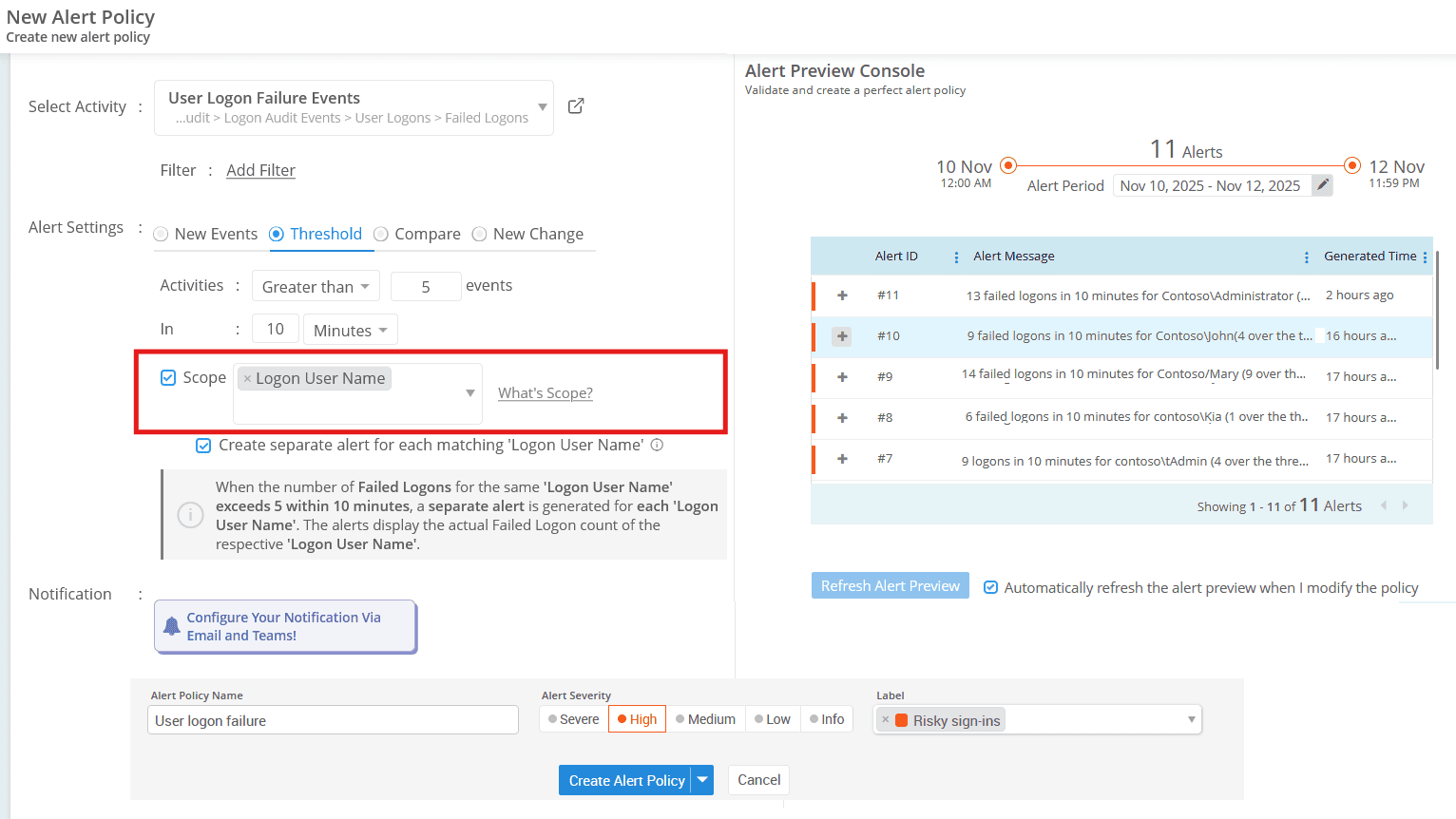
Some events only become critical in the right context. For example, 5 failed sign-ins across your organization may not be alarming. But 5 failed sign-ins from a single user? That could be a security concern.
Set the scope to the property “Logon User Name” to monitor activity at the user level and catch issues early.

Filter What Matters

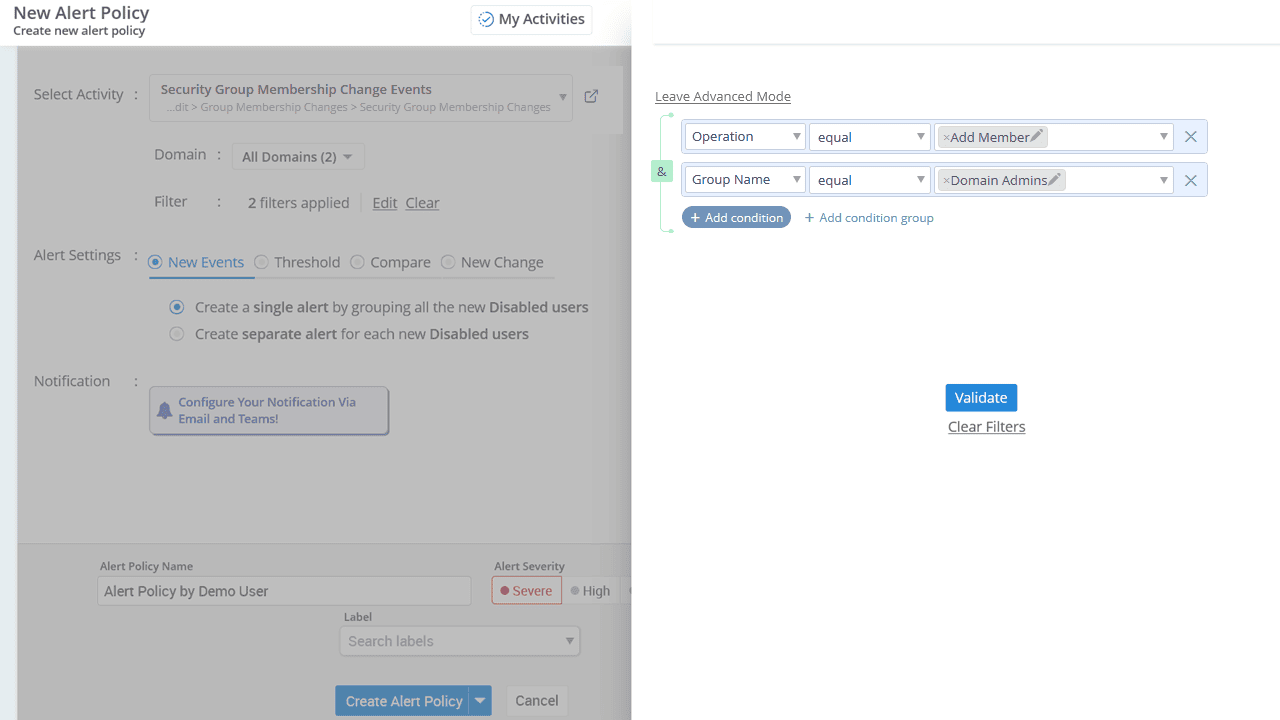
Narrow your focus by filtering alerts using attributes like group name, user ID, performed by, and more. For example, instead of triggering alerts for every group membership change, you can set alerts to notify you only when the Domain Admins group membership is modified.

Make Alerts Actionable

Alerts are truly actionable only when they carry the right context and are clear & well-organized. With AdminDroid, you can:

Customize

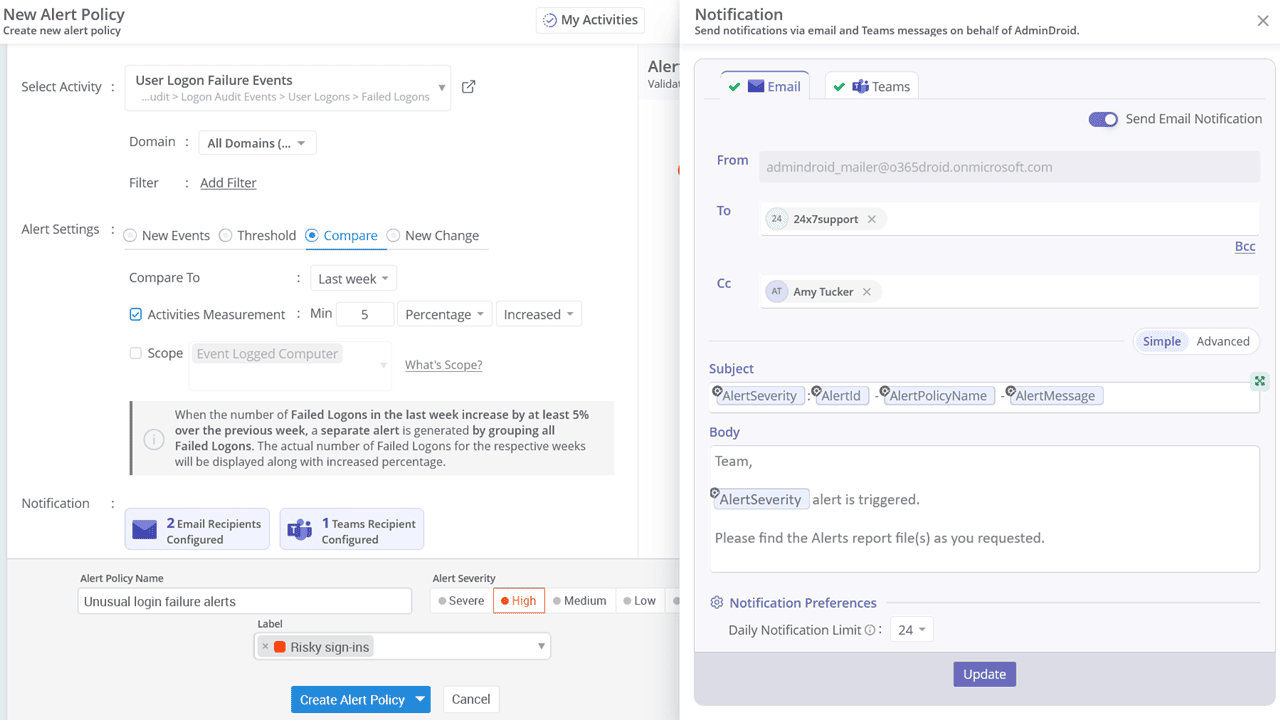
Customize alert emails that align with your organization’s communication style and urgency. You can personalize the email header, body, font color and size, and even include attachments, images, quotes, and more.

Categorize

Apply labels to organize and quickly identify alerts by type. Choose from Built in labels or create custom ones to reflect specific use case.

Prioritize

Every alert isn’t equal. Assign severity levels like Severe, High, Medium, Low, or Info to highlight what needs immediate attention and what can wait.

Alerts Scope Alerts Filter Make Alerts Actionable

Validate Your Alert Policies with the Alert Preview Console

Don’t turn your inbox into a SIEM. Use your audit data to create a smarter alert policy.

More alerts aren’t always better. That’s why AdminDroid helps you preview and perfect your Active Directory alert policies before they go live. The Alert Preview Console helps you strike the right balance by using your organization’s audit data to simulate alerts before they’re triggered.

AdminDroid reviews your past audit logs to show how many alerts your current policy would have generated.

You can then adjust thresholds or conditions until the previewed alerts match your real-world expectations.

This ensures your alert policies are accurate, meaningful, and tailored to your environment, not based on assumptions.

Alert on Critical Active Directory Attribute Changes

From subtle tweaks to major edits, catch every Active Directory attribute change as it happens.

With AdminDroid, you can go beyond basic event-based alerts. Set up notifications when specific properties within Active Directory objects are modified. Whether it’s user attributes, group settings, or computer configurations, you have the flexibility to monitor thousands of property-level changes that impact your environment.

A glimpse of what you can catch

User Moved to a Different Department?

Trigger an alert when a user’s “Department” attribute is updated. This helps promptly update group memberships and access permissions.

Accidental Deletion Protection Disabled?

Stay informed if the “Protect from Accidental Deletion” setting on an Organizational Unit is disabled. It’s a critical signal for potential tampering or mistakes.

Suspicious Membership Growth?

Set alerts when a user's group membership count suddenly spikes or exceeds a defined count. Perfect for detecting permission expansion or unauthorized access escalation.

Sensitive Role or Title Updates?

Receive alerts when sensitive attributes like “Job Title”, “Manager”, or “Group Scope” are changed. These changes often impact access rights and should never go unnoticed.

Deploy Alerts from Pre-built Active Directory Alert Policies

No need to start from scratch. Click, deploy, and get alerted.

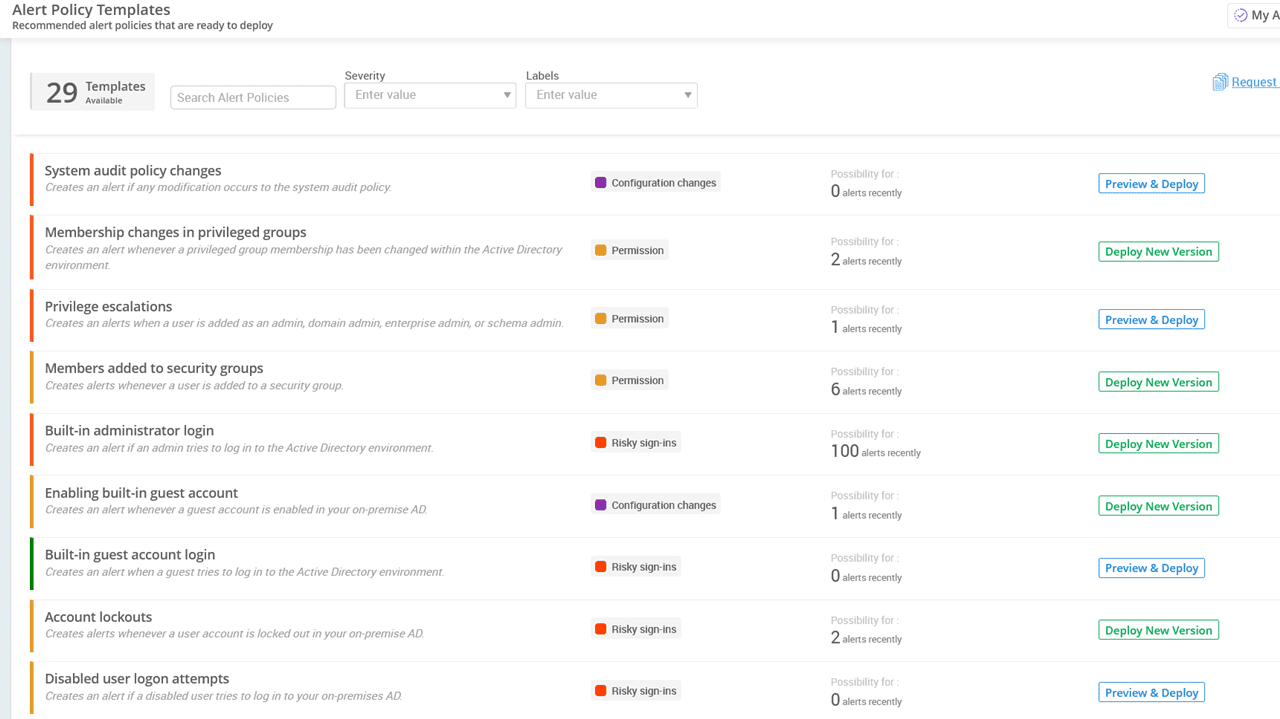
Get started in seconds with 25+ ready to use Active Directory alert policies tailored for real world scenarios. From critical admin changes to security-sensitive activities, these pre built policies cover the essentials every organization needs. Just select a policy and deploy it. Alerts will be triggered automatically whenever those actions occur.

Permission

Monitor critical changes in access, roles, and permissions.

Threat Management

Detect risky behaviors and early signs of compromise in Active Directory.

Risky Sign-ins

Identify login behaviors that signal potential compromise.

Configuration Changes

Stay informed on critical changes to Active Directory settings and policies.

Permission

Permission

Permission alerts give you visibility into the most sensitive actions such as privilege escalation, user creation, and group access changes.

Privilege escalations

Severity - High

Creates an alert when a user is added as an administrator, domain admin, enterprise admin, or schema admin.

Membership changes in privileged groups

Severity - High

Creates an alert whenever a privileged group membership has been changed within the Active Directory environment.

Members added to security groups

Severity - Medium

Creates alerts whenever a user is added to a security group.

New user creation

Severity - Info

Creates an alert when a new user is created in your on-premises Active Directory.

Unusual privileged group membership changes

Severity - High

Creates an alert if the privileged group membership changes become unusual by comparing with the same day in the previous week.

Threat Management

Threat Management

Threat alerts help you detect potential compromise attempts, risky user behaviors, credential exposure, etc.

Audit log clearance

Severity - Severe

Creates alerts when the audit logs have been deleted from the systems.

Scheduled Tasks containing passwords

Severity - High

Creates alerts if a task is scheduled along with the hard-coded password.

Admin SD holder attack possibilities detection

Severity - High

Creates alerts whenever any potential attacks occur targeting the AdminSDHolder object in Active Directory.

Kerberos tickets with RC4 encryption

Severity - High

Creates alerts if the Kerberos tickets use RC4 encryption.

DSRM administrator password reset

Severity - High

Creates alerts whenever the password has been reset for the Directory Services Restore Mode (DSRM) admin account.

Risky sign-ins

Risky sign-ins

Sign-in alerts help you detect unusual logon patterns, failed login spikes, unauthorized access attempts, etc.

Built-in administrator login

Severity - High

Creates an alert if a built-in administrator account login to Active Directory.

Account lockouts

Severity - Medium

Creates alerts whenever a user account is locked out in your on-premises AD.

Disabled user logon attempts

Severity - Medium

Creates an alert if a disabled user tries to log in.

Unusual user login failures

Severity - High

Creates an alert when a user has an unusual number of failed logins within a short period.

Unusual account lockouts in a shorter period

Severity - Severe

Creates an alert when the number of account lock-out events becomes unusual within a short period.

Unusual lockouts in the organization

Severity - High

Creates an alert if the account lockouts become unusual by comparing with the same day in the previous week.

Unusual disabled user account logon attempts

Severity - Medium

Creates an alert when the disabled user logon attempts become unusual by comparing with the same day in the previous week.

Unusual login failures

Severity - High

Creates an alert when the account login failures become unusual by comparing with the same day in the previous week.

Built-in guest account login

Severity - Low

Creates an alert when a built-in guest account tries to log in to the Active Directory environment.

Unusual guest logins

Severity - Medium

Creates an alert if the guest user logins become unusual by comparing with the same day in the previous week.

Configuration Changes

Configuration Changes

Get alerts on critical modifications that can impact security or disrupt directory services.

System audit policy change

Severity - High

Creates an alert if any modification occurs to the system audit policy.

Enabling built-in guest account

Severity - Medium

Creates an alert whenever a guest account is enabled in your on-premises AD.

Re-enabling disabled users

Severity - Medium

Creates alerts when a disabled account gets re-enabled in your on-premises AD.

Objects moving from one OU to another

Severity - Info

Creates an alert if the directory object is being moved within the Active Directory.

OU deletions

Severity - Medium

Creates alerts if an organizational unit is deleted from the domain.

Password policy changes

Severity - Medium

Creates alerts whenever the password policy gets modified.

Lockout policy changes

Severity - Medium

Creates alerts whenever the domain lockout policy gets modified.

Domain trust changes

Severity - High

Creates alerts when the trust is added, removed, or modified in your on-premises AD.

DC/Server restart and shutdown

Severity - Info

Creates alerts if the domain controller or server gets shut down or restarted.

Set Up Alert Delivery the Smart Way

Reduce alert noise and enhance visibility with intelligent delivery options.

Get Alert Notification in MS Teams

Receive real-time Active Directory alerts in Teams through chats, groups, or channels. Just like email alerts, Teams notifications can also be customized to match your needs.

Group and Send as a Single Alert

Avoid alert fatigue by bundling similar events into a single, easy-to-read notification. Ideal for informational alerts such as user moves, password resets, or group modifications. You receive one consolidated alert instead of fifty separate ones.

Prevent Notification Overload

Control the number of email notifications you receive each day for noisy alert policies. Your inbox stays clean, while alerts continue to be generated and logged without limits.

Visualize and Manage Alerts Beyond Email Notifications

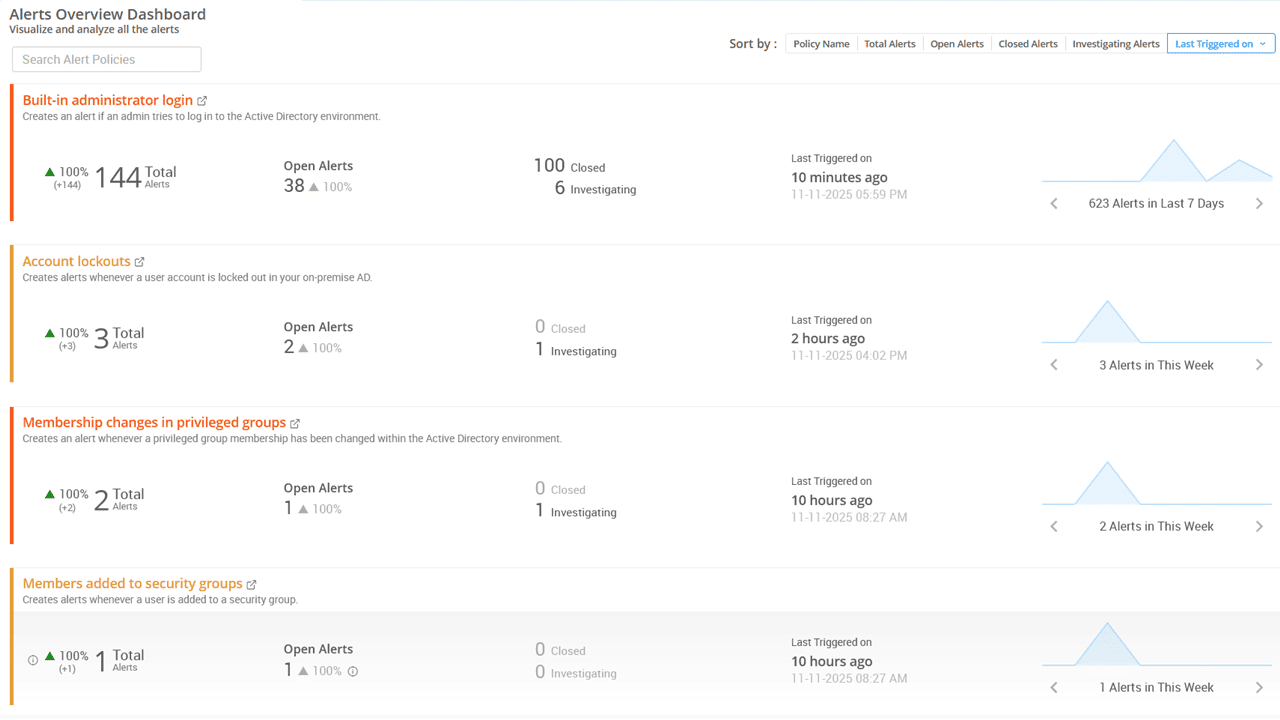
Get complete visibility into all triggered alerts from a centralized dashboard.

Once alerts start flowing in, you need more than just inbox notifications. AdminDroid gives you the clarity and control to monitor, investigate, and act on alerts effectively.

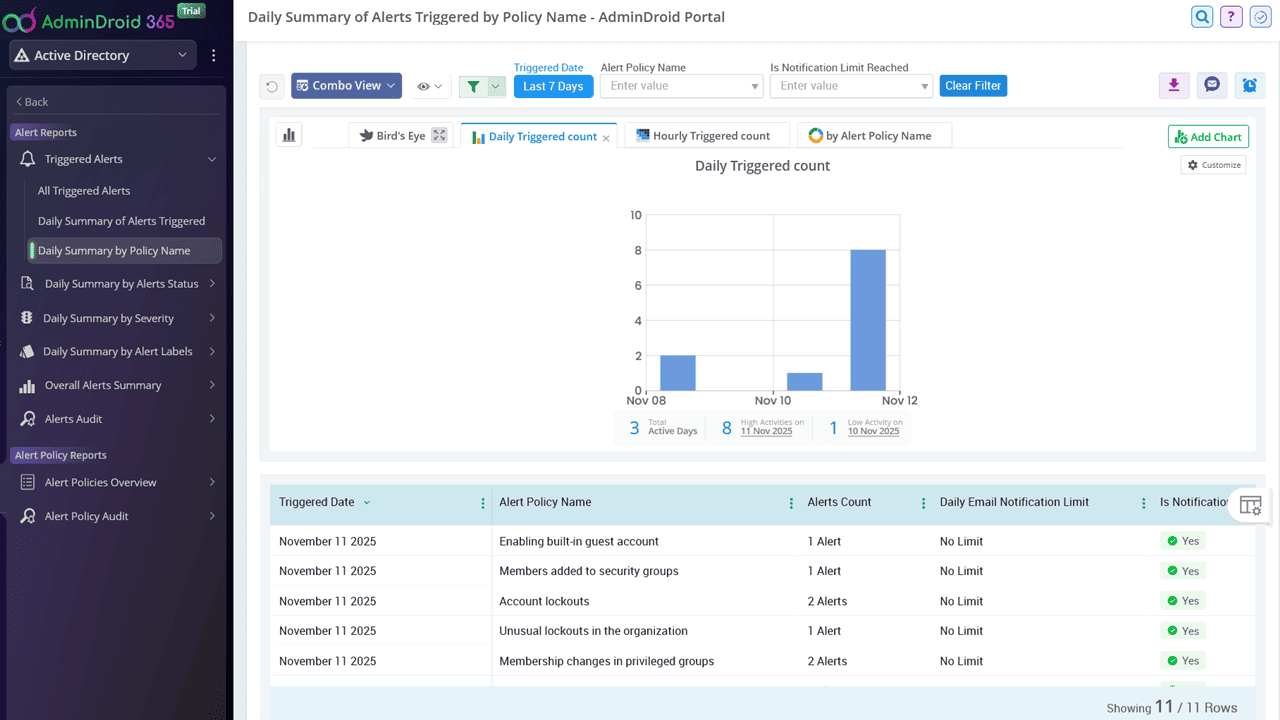
Unlock deeper insights with 30+ built-in alert reports

Quickly explore alert trends, severity levels, and daily summaries in just a few clicks. Schedule email delivery and delegate report access to keep your team fully informed.

Investigate and resolve alerts quickly

Drill into each alert with rich event details, including what changed, who triggered it, and when it happened.

Keep track of unresolved alerts

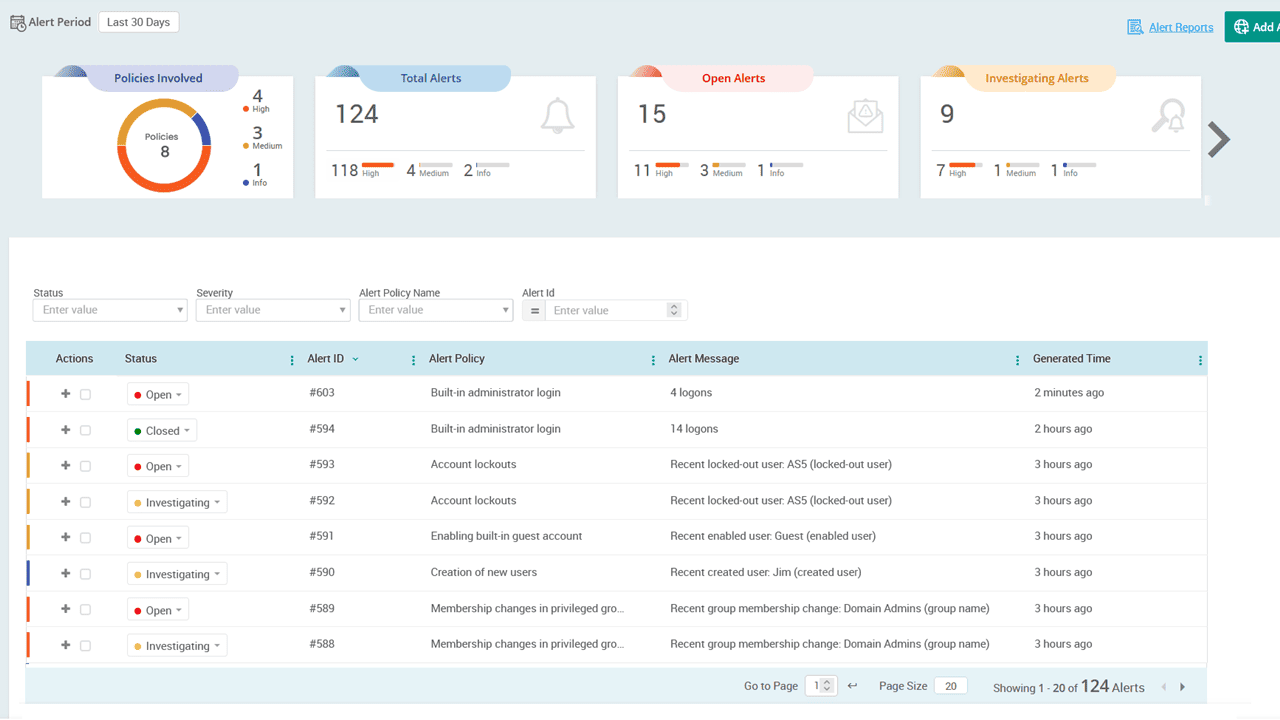
Stay in control of alerts by updating their status. Move from open to investigating, or close them, so every alert gets the attention it needs.

Prioritize what needs your attention

Easily sort and filter alerts by severity, status (open, closed, or investigating), or time to stay focused on the most critical actions.

Alert Dashboard
Alerts Overview
Alert Reports
Alert Policy Templates

Never miss a critical Active Directory event again. Get instant alerts with AdminDroid.

Download Active Directoy Alerting Tool