🎉 Our Microsoft 365 Reporting & Management Tool is now available in Azure Marketplace 🚀
This website uses cookies to improve your experience. We'll assume you're ok with this. Know more.

AdminDroid 365

Let the reminders do the remembering, so you can focus on managing. From expiring passwords to pending MFA activations, AdminDroid automates every follow-up that keeps your Microsoft 365 environment secure!

AdminDroid 365 Reminder Agents and Follow-ups

Automate Reminders and Follow-Ups in Microsoft 365

Managing a Microsoft 365 environment involves more than just setting things up. Every day, something changes, expires, or waits for action, and it’s the admin’s job to catch it before it causes trouble. Yet, silent risks quietly pile up:

Passwords are about to expire, and users don’t update them.

MFA activation is pending, but no one acts.

Teams become ownerless or inactive, but admins often overlook them.

Licenses run low, no one notices until someone loses access.

Mailboxes are full or forwarded externally, and it’s missed.
Admins do their best to stay ahead, but the process is exhausting. Sending reminders manually. Digging through logs. Creating spreadsheets. Copy-pasting email templates. And still things slip through.

This is exactly where AdminDroid 365’s Reminders & Follow-ups makes the difference.

How Do AdminDroid’s Reminder Agents Change the Game?

No Scripts, No Manual Configurations, Just Effortless Reminders That Work

Discover how Reminder Agents help you stay on top of pending tasks.

Reduce Manual Effort

You no longer need to check logs, build reminders, or send manual emails. Deploy it once and let it run.

Improve Action Rates

Every reminder is delivered automatically, eliminating missed notifications and improving on‑time completion.

Enhance Compliance

Be it MFA enforcement or license renewal, stay on top of security and compliance tasks with verifiable audit trails.

Target Notifications with Filters

Filters allow you to precisely target which users should receive the reminders. You can also try nesting multiple conditions logically in advanced mode to refine targeting further.

Communicate Through the Right Channels

Flexibly choose email, Teams, or both to make sure reminders reach users in the way they respond fastest.

Act Intelligently

Each agent is context aware. It reminds you only when action is needed. No spam. No noise.

Track All Step & Stay Audit Ready

Every deployed agent comes with built-in tracking & reporting. You’ll know who received the reminder, who acted & when.

Tailor Emails Your Way

From subject to CTA, control exactly what users see, so they act faster and ask fewer questions.

Your Complete Command Control for Reminders and Follow-ups

Take Charge of Expiry Dates, Ownership Gaps, and Missed Actions

Here’s what’s under the hood:

“All reminders, one view.”

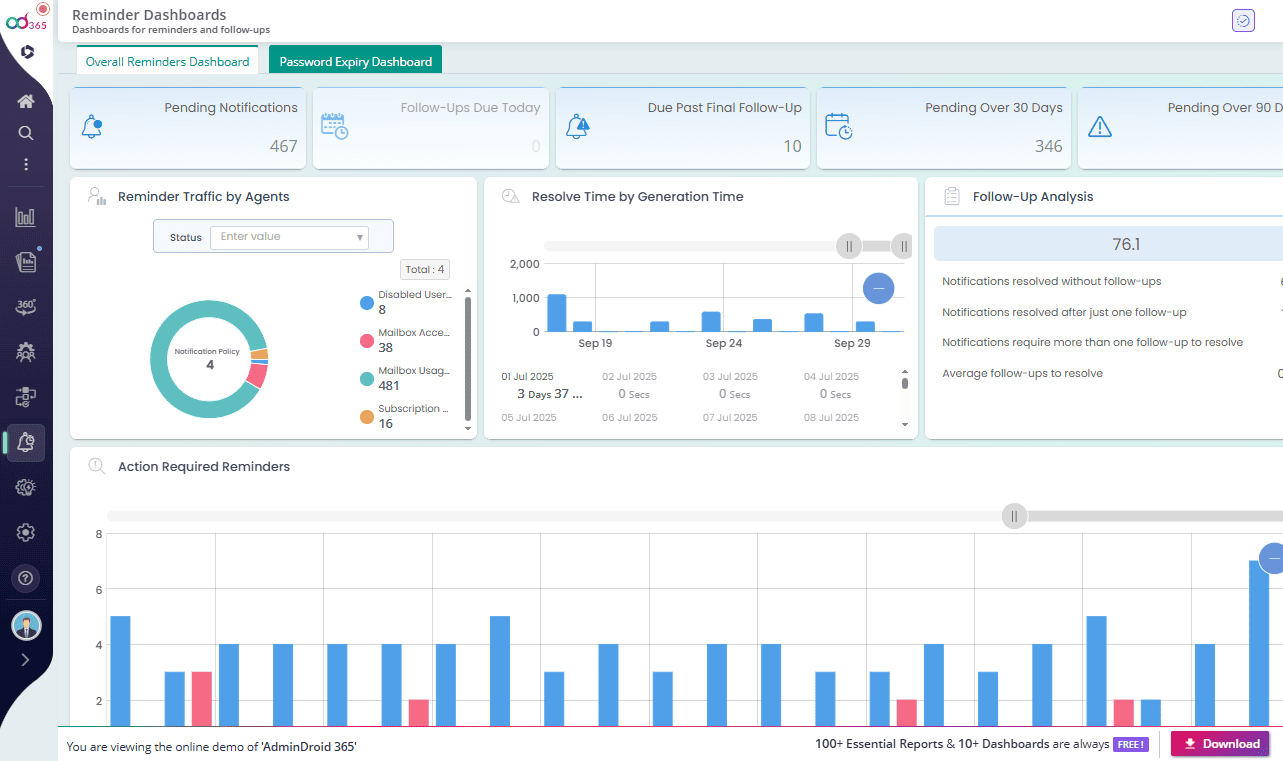
Centralized Dashboard

“All reminders, one view.”

Gain a consolidated view with powerful dashboards for reminder agents. Stay informed with current reminder volume, resolution time, follow-up effectiveness, pending items, and agent-wise traffic.

"Find and act fast"

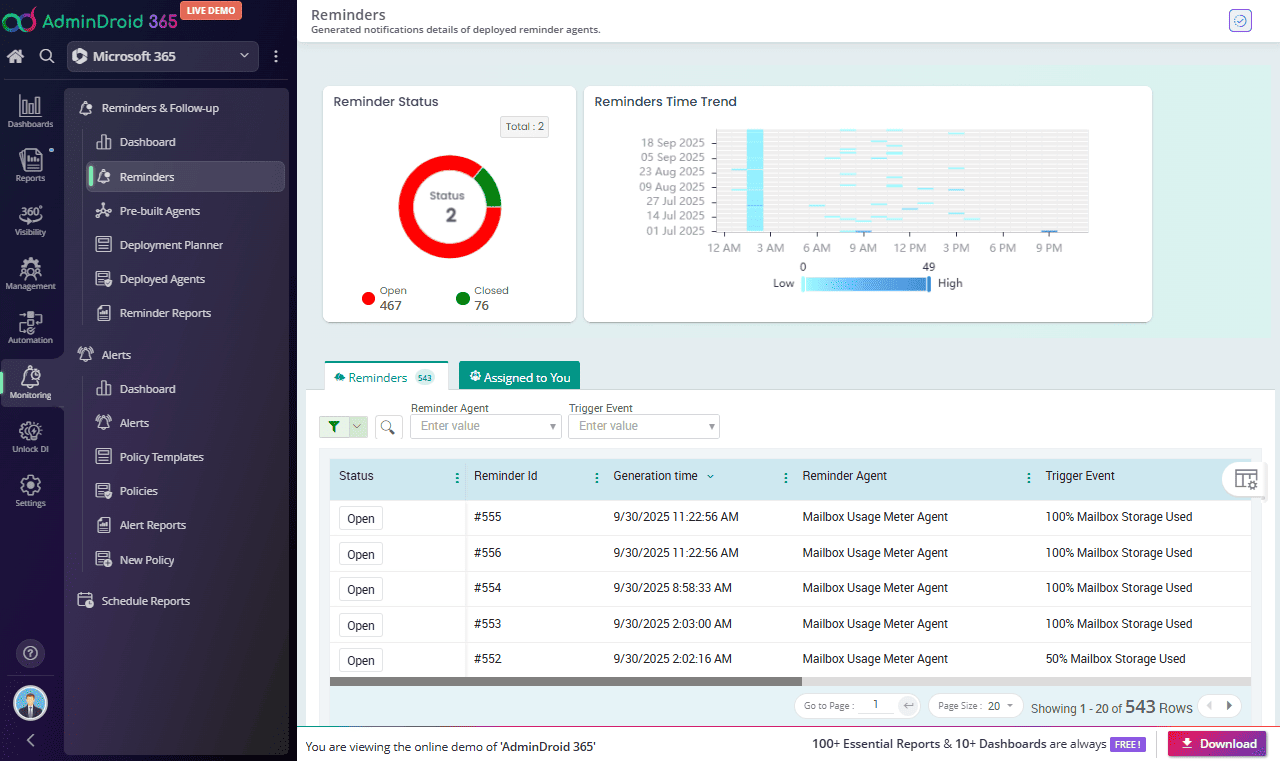
Reminders Panel

"Find and act fast"

Drill into each deployed reminder agent, along with those personally assigned to you. Quickly filter by reminder agent name, follow-up status, type, target object, etc., to take immediate action. Reminders come enriched with triggered time, assigned users, and detailed metadata.

“Deploy in one click.”

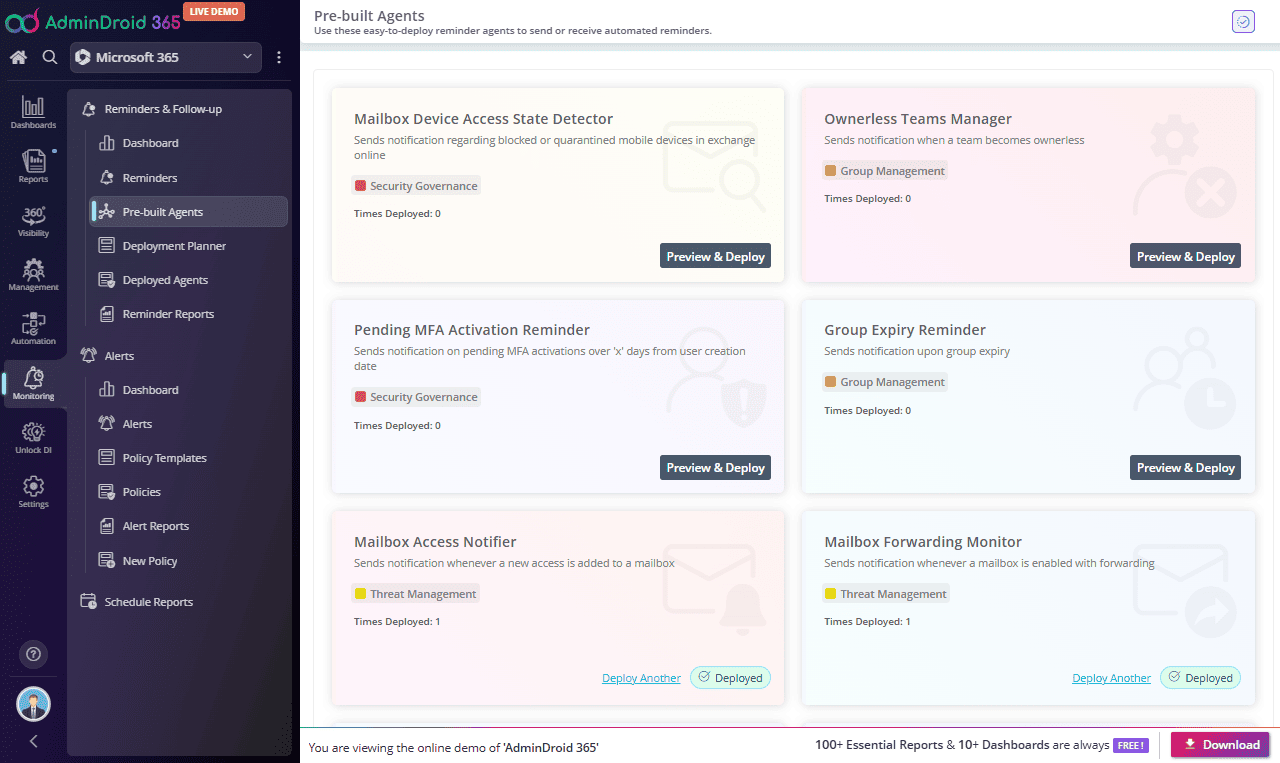
Pre-built Reminder Agents

“Deploy in one click.”

No need to start from scratch! AdminDroid comes with a rich set of ready-made reminder agents, each designed to solve real-world administrative challenges without requiring manual configuration. Deploy what’s critical and ignore what’s not. It’s that simple.

“Plan smart, deploy right.”

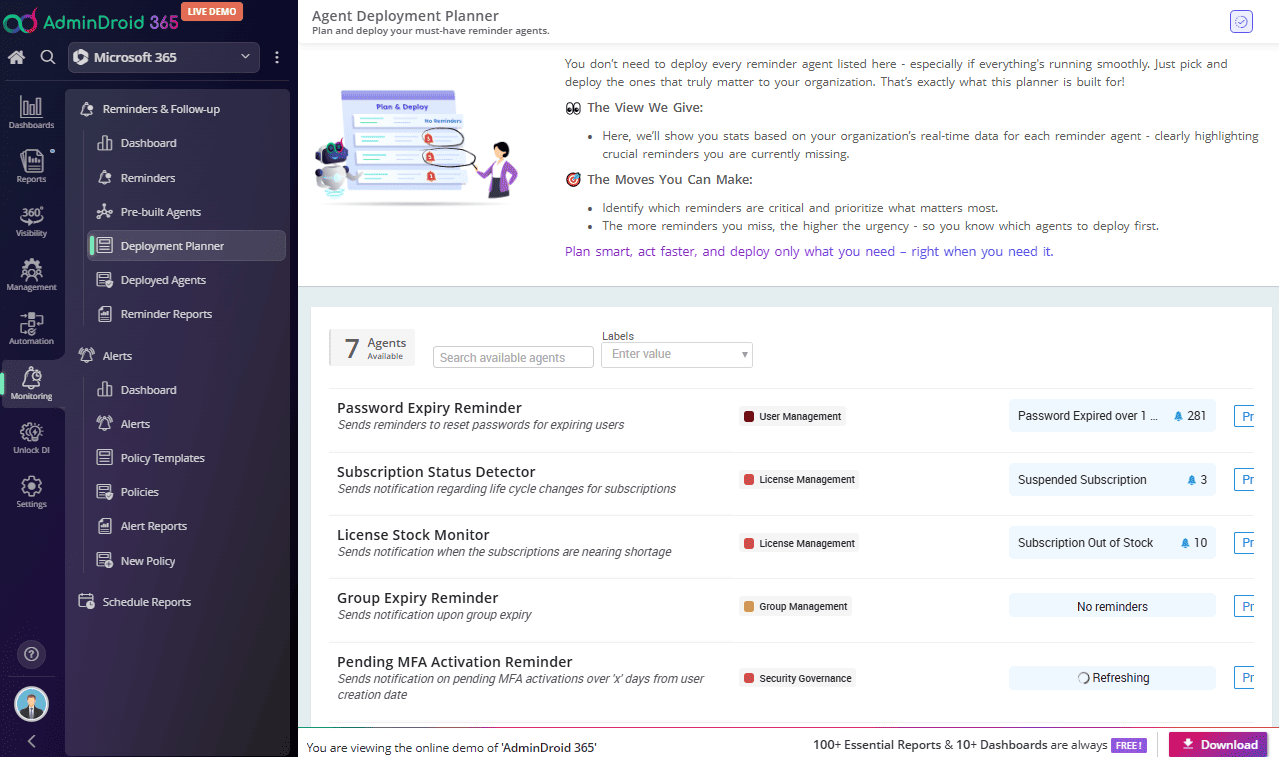
Deployment Planner

“Plan smart, deploy right.”

Strategically decide which agents to deploy. The deployment planner provides a smart overview of available vs. deployed agents. You can see real-time data highlighting exactly where reminders are needed, for example, 100% Mailbox Used or Password Expiry Alerts.

“Track and tweak live.”

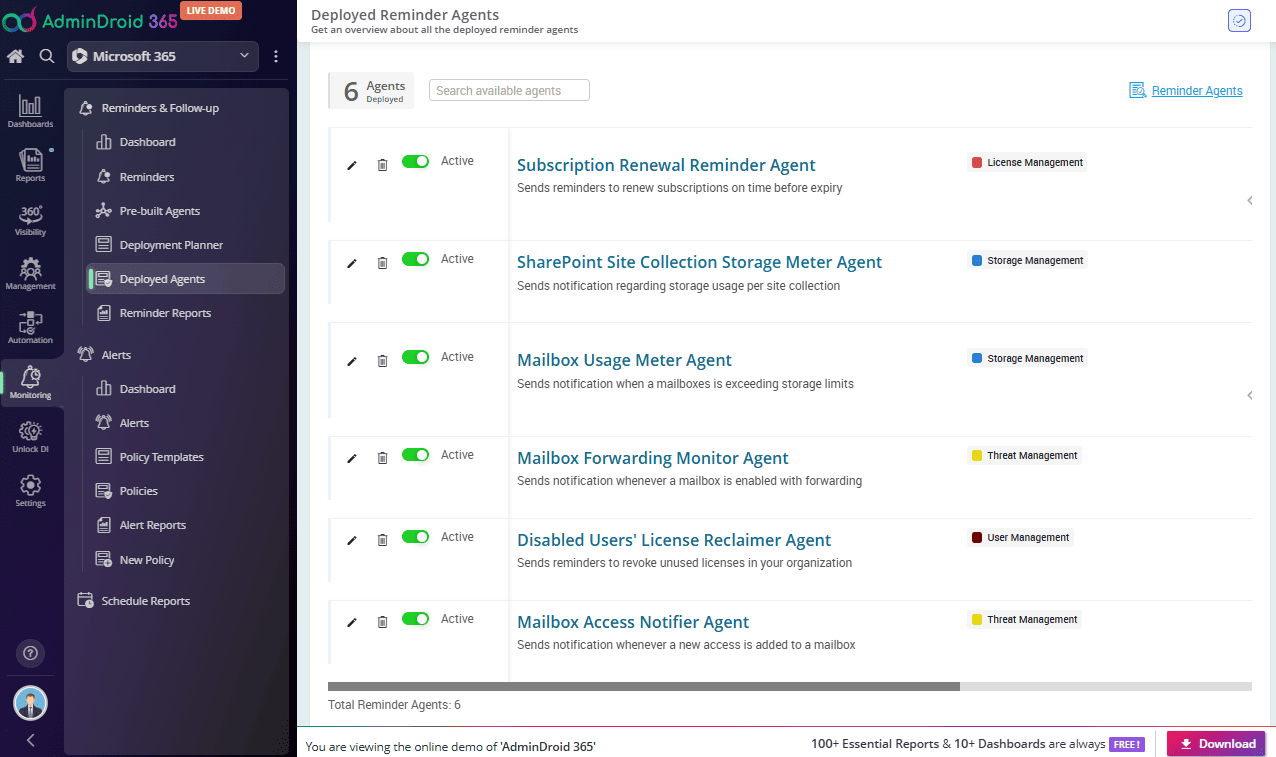
Deployed Agents View

“Track and tweak live.”

Keep tabs on all running reminder agents and their impact. See which ones are actively running, how many reminders they’ve sent, and what their recent trends look like. This is where you edit the deployed Reminder agent.

“See, export, and schedule.”

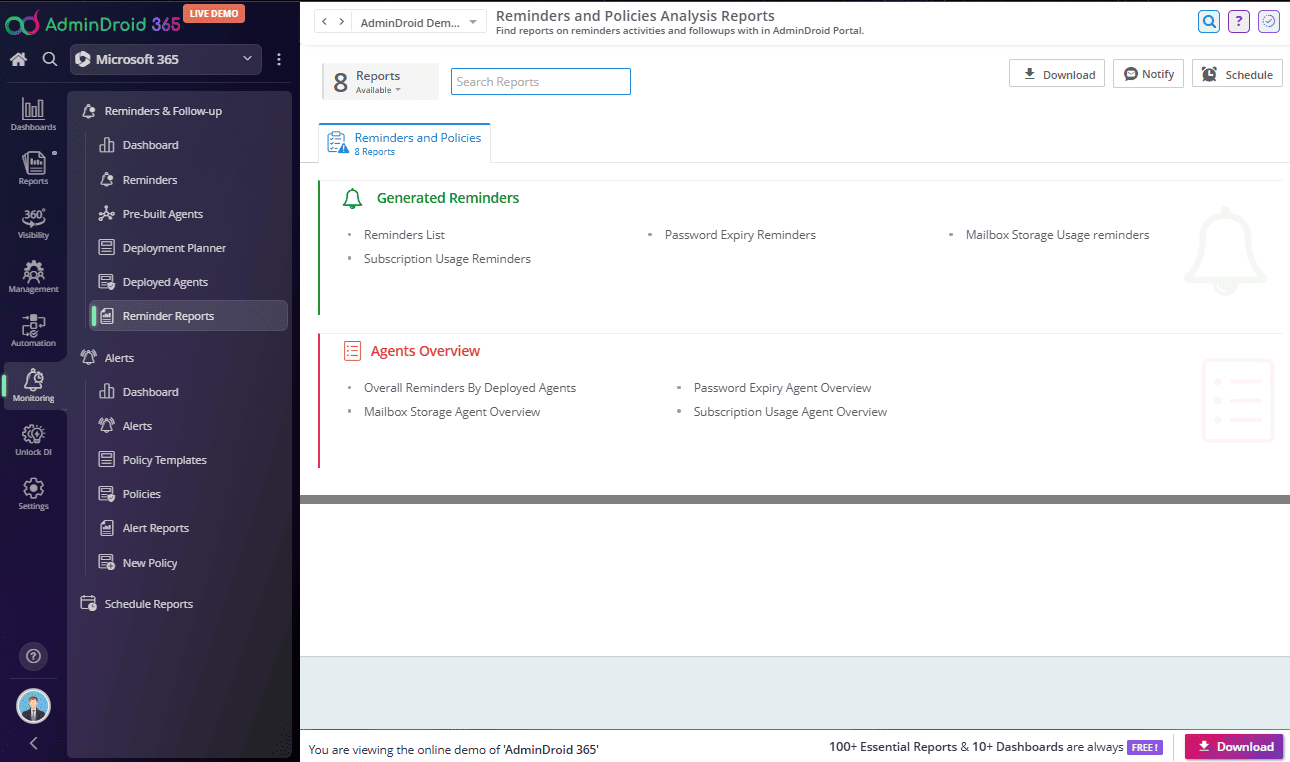
Reminder Reports

“See, export, and schedule.”

The Reports section provides detailed reports, offering lists of generated reminders and comprehensive overviews of your deployed agents activities. Utilize the download, notification, and scheduling options for streamlined reporting.

Effortless Deployment That Keeps Your Reminder on Time, Every time

Assistant Every Admin Deserves: Silent, Smart, and On Schedule!

AdminDroid’s prebuilt reminder agents come with everything you need to get started, including default follow-up frequencies, initial trigger messages, follow-up content, and more. These agents are ready to use as they are, yet offer the flexibility to be customized according to your organization’s specific needs.

Pick the Right Reminder Agent: One Click Is All It Takes

Navigate to the Prebuilt Agents page and click Preview & Deploy on the agent you wish to use.

Pick the Right Reminder Agent

Customize Your Follow-up Strategy

Want to tweak the flow? Define your own trigger conditions, set follow-up intervals, and choose who gets notified. All customizations can be made effortlessly within the provided sections.

Step-1

Review Trigger Settings

This section defines when the reminder should be fired and who it targets.

Check the default trigger values, follow-up schedule, and any filters.

Adjust settings as needed to better match your organization’s requirements.

Select the tenant the agent should be deployed to.

Click Next to move forward.

00:00 / 00:00

Step-2

Configure End User Notifications [If Applicable]

At the time of the event, notifications will be automatically sent to the required end users and will be assigned to them. Customize the reminder delivery method, letting end users get notified through Email, Microsoft Teams, or both, based on your preference.

Email: Modify email settings and customize messages if needed (branding, layout, content).

Teams: Choose to notify the assignee via User, Channel, or Group Chat.

Click Next to proceed.

00:00 / 00:00

Step-3

Configure Admin Notifications

Choose admins and how they should be alerted when the reminder is triggered. Email or Teams or both.

Email: Add admin email addresses, customize message if needed (branding, layout, content).

Team: Choose to notify via User, Channel, or Group Chat.

Once set, click Next.

Note: When end user notification is not turned on, admins will remain as an assignee for those generated reminders.

00:00 / 00:00

Step-4

Review and Deploy the Reminder Agent

Turn on Missed-out Reminders for required triggers to inform you of any past events that were missed. These will be sent right away when the agent is deployed (Optional)

Label your agent and provide a short description.

Click Deploy to activate your reminder agent.

00:00 / 00:00
Show All