🎉 Our Microsoft 365 Reporting & Management Tool is available in Marketplace 🚀

Active Directory Reminders and Follow‑ups to Keep Tasks on Time

Manual tracking of Active Directory tasks often leads to delays and heightened security risks. AdminDroid’s automated reminders solve this by ensuring timely follow-ups for critical security, access, and account management actions. Notify the right people at the right time to keep every key Active Directory task on track and drive immediate action.

Active Directory Reminders and Follow-ups to Keep Tasks on Time

What Sets AdminDroid Active Directory Reminders Apart?

Remembering everything isn’t possible, but getting reminded at the right time is, and AdminDroid reminders help you do just that!

Eliminate Manual Active Directory Reminder Setup

Skip manual setup and deploy AdminDroid agents once for on-time, action-based reminders.

Deliver Reminders via Email and Teams

Send critical Active Directory reminders via email, Teams, or both to reach users where they respond.

Automate Follow-Ups for Critical Reminders

Boost response rates with automated follow-ups that ensure no critical notification is ever missed.

Target the Right Users with Every Reminder

Deliver reminders to the relevant users and admins with context-aware reminder agents that minimize notification noise.

Trigger Reminders for Current Conditions

Automatically notify users who already meet the reminder criteria at the time of policy configuration using the Missed-out Reminders option.

Craft Custom Reminder Messages That Drive Action

Build high-impact, branded email messages in minutes with drag-and-drop ease.
Never Miss a Task with Ready-to-Use Active Directory Reminder Agents

AdminDroid’s pre-built reminder agents handle everything from routine tasks to urgent alerts with ease.

Password Expiry Reminder

Notifies users 7 days before AD password expiry and sends follow-ups for timely action, preventing lockouts.

Account Expiry Reminder

Notifies users 7 days before account expiry and follows up, while alerting admins and managers to enable timely action.

Never Expiring Password Change Reminder

Reminds users with never-expiring passwords who haven’t updated in 90 days, reducing credential exposure and security risks.

Krbtgt Password Reset Reminder

Sends automated reminders every 40 days to reset the krbtgt account, preventing Golden Ticket attacks and strengthening domain security.

Locked-out User Monitor

Reminds admins of locked-out AD accounts to help investigate root causes during prolonged lockout states, recurring credential failures, or security forensic audits.

3 Easy Steps to Keep an Eye on Your Active Directory

Pick a Reminder Agent

Quickly identify and select the reminder workflows that fit your requirements using the built-in deployment planner.

Step 01

Deploy Your Way

Fine-tune due dates, follow-up schedules, domain-specific policies, and reminder messages to match your organization’s needs. Once deployed, the right users receive timely reminders with the right context.

Step 02

Get Timely Reminders

Monitor exactly how many users have been notified, the number of follow-ups sent, pending actions, and more to ensure no task falls through the cracks.

Step 03

Take Full Command of Your AD Reminders through a Unified Console

Don’t just send basic Active Directory reminders. Customize, track, and target them with precision using AdminDroid.

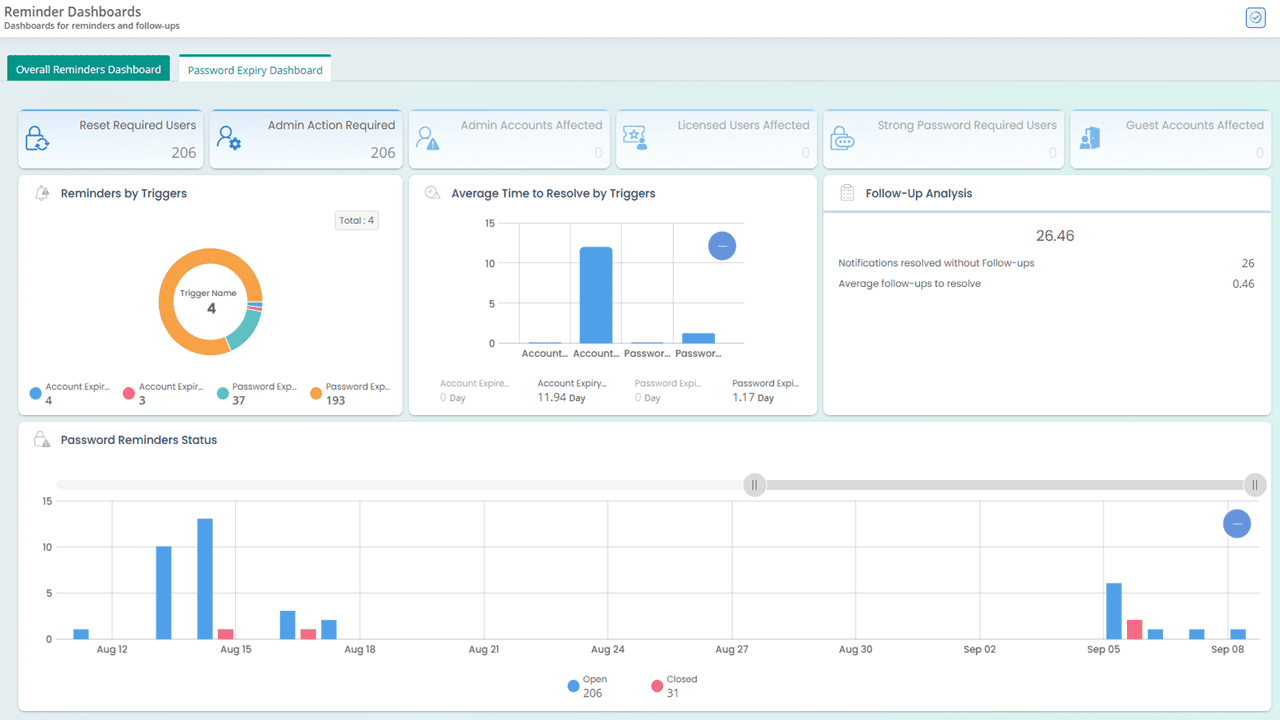
Active Directory reminder dashboards in AdminDroid
Reminder Dashboards

Stay in Control with the Active Directory Reminder Dashboards

Notifying password expiry or account lockout isn’t enough. You also need visibility into who acted, who didn’t, and follow-up status to take the right actions. Reminder dashboards bring this together by showing reminder volume, pending notifications, follow-up insights, and more in one place.

From follow-ups due today to long-pending notifications, take control of every reminder and never miss a critical task.

Monitor and manage Active Directory reminders in one panel
Reminder Panel

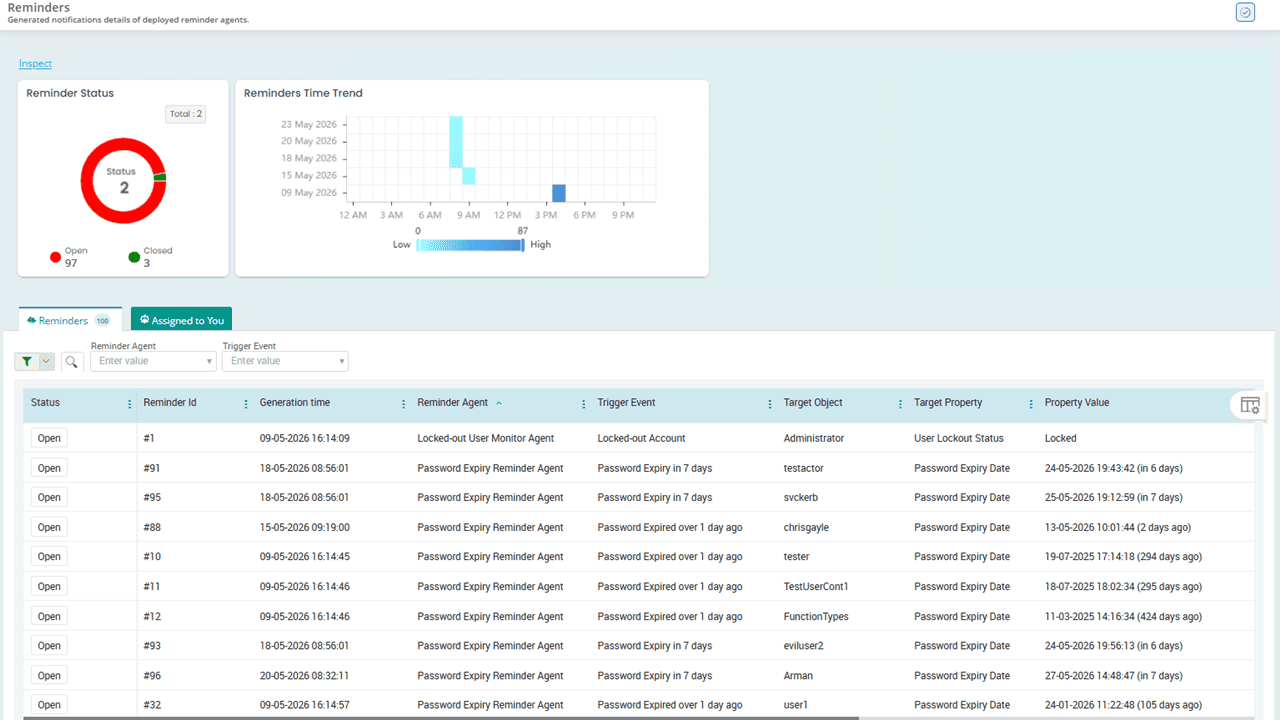
Monitor and Manage Your Directory Reminders with Ease

The AdminDroid Active Directory reminder panel consolidates all reminders in one place, including those from configured reminder agents as well as reminders personally assigned to you. The panel shows key details and lets you review, filter, and close reminders, helping you stay organized and act promptly.

Tired of scattered reminders? Get organized and stay on top of your Active Directory tasks from one place!

Plan and deploy Active Directory reminder agents
Deployment Planner

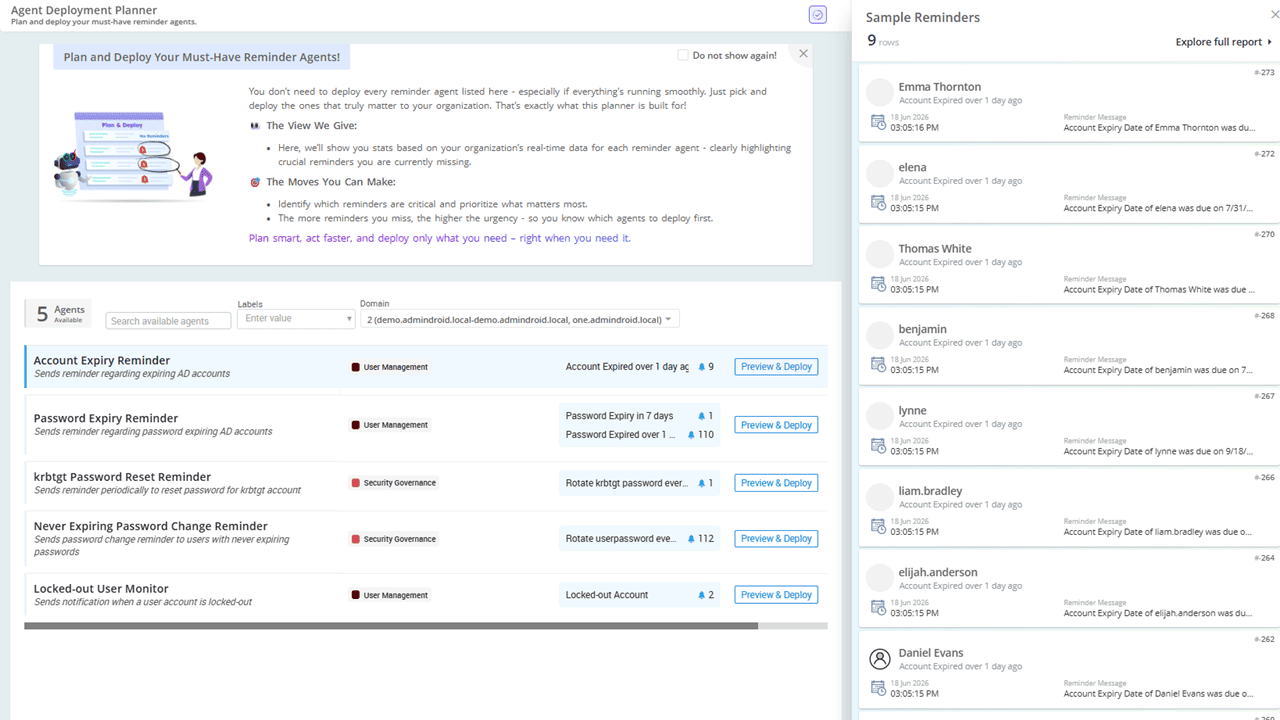
Plan, Prioritize, and Deploy Active Directory Reminders Effectively

The AdminDroid deployment planner shows reminder stats for each agent based on your organization’s real-time data. It highlights crucial reminders you might be missing, helping you quickly deploy what needs attention. Once deployed, you can easily edit, pause, enable, or delete reminder agents from the deployed agents view.

Plan Active Directory reminders that actually work for you with real-time insights.

Actionable insights from Active Directory reminder reports
Reminder Reports

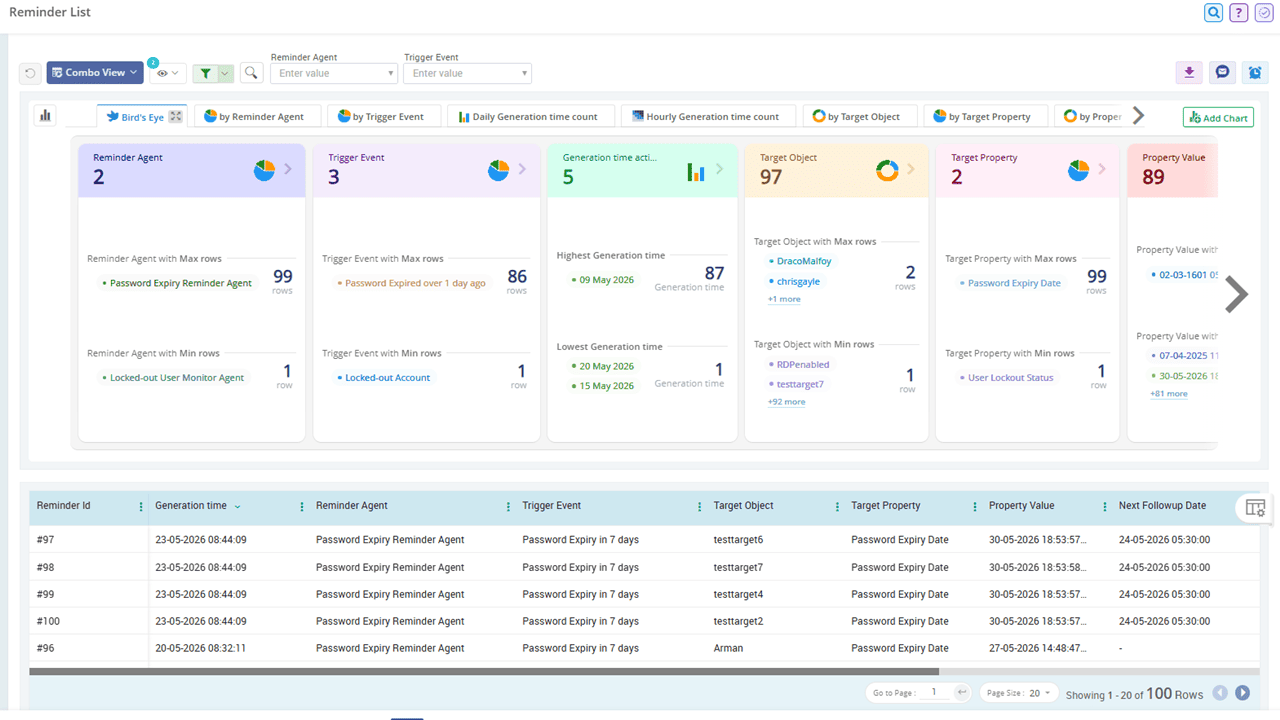
Get Actionable Insights with Reminder Reports

Reminder reports provide granular visibility into when a reminder was delivered, who received it, its resolution status, and more. You can use these insights to eliminate communication gaps, sharpen your targeting, and ensure accountability.

In-depth reports on your Active Directory reminders to identify gaps and improve policy effectiveness.

Never Miss a Critical Active Directory Reminder Again

Deliver the right reminders to the right users at the right time with automated, context-aware notifications using AdminDroid.

Active Directory Reminders and Follow-ups Illustration