🎉 Our Microsoft 365 Reporting & Management Tool is now available in Azure Marketplace 🚀
Free tool

Simplify Active Directory Management with AI

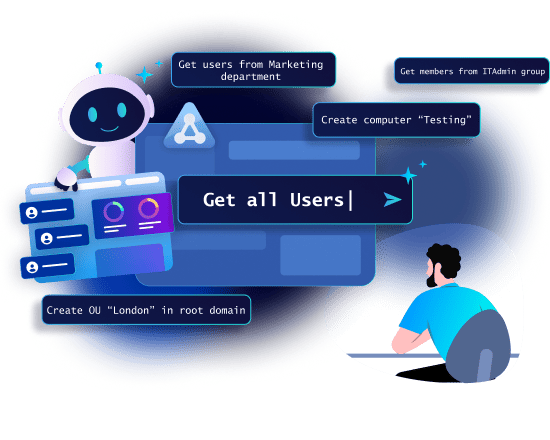
Turn complex Active Directory management into a simple chat with AdminDroid AI Assistant for Active Directory. Easily explore and manage users, groups, computers, and much more in plain English.

Download
Simplify Active Directory Management with AI

No Cost, No Expiry

Secure by Design

No Scripting Required
Why Choose AdminDroid AI Assistant for Active Directory?

Reimagine Active Directory management with AdminDroid AI Assistant. Create, update, or delete AD objects, and generate detailed reports with visual insights — all through plain-English queries. Experience effortless Active Directory management and reporting with AdminDroid AI Assistant.

No PowerShell required

Explore Active Directory and get insights using plain English queries.

Turn Words into Actions

Create users, update groups, and manage AD objects by simply asking. No scripts required.

See Data Your Way

Switch between detailed tables and visual charts with one click.

Privacy-First AI Processing

Your sensitive data stays secure and protected before any AI processing.

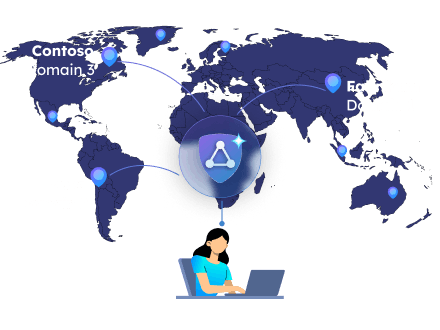
Unified Multi-Domain Control

Switch between and manage multiple domains instantly from one interface.

Flexible AI Options

Choose the AI engine that suits your needs and switch anytime.

Your AI-Powered Companion for Active Directory

Turn Your Words into Active Directory Reports

Forget writing complex PowerShell scripts and LDAP syntax to generate reports. Simply type what you need in plain text and AdminDroid AI Assistant for Active Directory generates accurate reports from your directory in seconds. Easily look up information across your entire domain in one place.

Visualize Active Directory Data Instantly

Don't just see the data, understand it. Run queries and view results in organized tables or switch to charts for deeper insights. Examine objects and attributes in detail with tables, or use graphical views to spot trends, highlight distributions, or summarize results at a glance.

Manage Active Directory without PowerShell - Say It, See It Done

Stop juggling PowerShell cmdlets for routine Active Directory management tasks. With the AdminDroid AI Assistant, you can create a new user, update department, modify groups, or clean up old accounts by simply asking. The tool understands what you mean and carries out the updates instantly, letting you focus on managing your directory instead of writing PowerShell scripts.

Protect Sensitive Active Directory Information from AI

Admins handle sensitive data daily, including user identities, credentials, and other private organizational information, so it’s crucial to keep it safe. AdminDroid AI Assistant for Active Directory ensures your critical data is protected before it’s processed by AI.

Automatic Data Masking

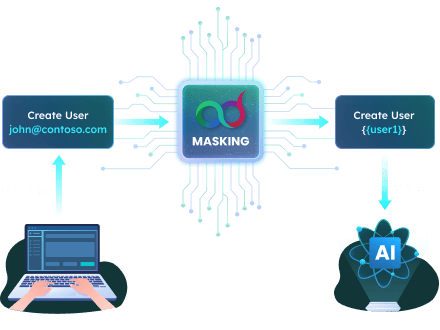
AdminDroid AI Assistant automatically hides PII, including email addresses, phone numbers, UPNs, IP addresses, credit card numbers, and sensitive dates, before any AI processing.

Custom Masking for Enhanced Security

Enclose sensitive data in double quotes and AdminDroid AI Assistant masks it on the spot.

For any other sensitive or private data such as a user’s employee ID, a confidential client name, or a project code that shouldn’t be sent for AI processing, simply put it in double quotes. This ensures your information is masked before it's ever processed by AI, giving you complete control over your privacy.

Protect Sensitive Active Directory Information from AI
Masking
Input
How AI see
Automatic masking
Get user john@contoso.com details 
Get user {user1} details
Advanced masking
Create security group “Development”
Create security group {group1}
Unmasked
Create security group Development

Getting the Best Results

Always mention the object type (such as user, group, or team) in your query so the tool knows exactly what you are referring to. Here are a few things you can try right away:

  • Modify Job Title of user alex@contoso.com to Job Title “Developer”
  • Get details of the group “Team AI”

Frequently Asked Questions

1. How can I verify that masking is working?

The tool shows a preview of how your input is transformed, helping you verify that sensitive data is properly protected.

2. Will masking affect how my requests or data are processed?

No, Masking only replaces or hides sensitive values to protect your privacy. The system still understands your request and processes it correctly, while keeping your private data hidden from external services.

3. I’ve enabled masking, but I forgot to use double quotes around my email address or phone number. Will it still be masked?

Yes. Common sensitive data types like UPNs, emails, phone numbers, and URLs are masked automatically, even without double quotes. Quotes are only needed for custom or uncommon data that you want to protect.

4. Is masking applied to all queries by default?

No. Masking is automatically applied only for standard PII like emails, phone numbers, URLs, or UPNs. For custom or uncommon data, you need to enclose it in double quotes to ensure it is masked.

5. How can I mask custom or non-standard PII data?

To mask custom sensitive data, enclose it in double quotes. This ensures that any information not automatically detected, such as internal IDs, project codes, or object names, is protected.

6. Can I choose to turn masking on or off?

Yes, you have full control over masking sensitive data. Simply toggle to activate or deactivate masking. It is ON by default.

7. Can I combine automatic and custom masking in the same query?

Yes. Automatic masking will handle standard PII, while you can also apply custom masking for other sensitive data in the same input by enclosing it in double quotes.

8. Why is masking important?

  • Protects your personal information from AI exposure
  • Helps you comply with privacy regulations and best practices
  • Prevents your data from being used for AI training or analysis without your permission

Accelerate AD Operations with GenAIs

Speed matters when you’re managing a large environment with thousands of objects. AdminDroid AI Assistant for Active Directory is powered by cloud-based Large Language Models (LLMs), which deliver results faster than on-prem solutions. With support for leading AI platforms such as Claude, Groq, Gemini, ChatGPT, and Cohere, you get unmatched performance and flexibility!

Accelerate AD Operations with GenAIs
Effortless Multi-Domain Active Directory Management

Effortless Multi-Domain Active Directory Management

Whether you're managing a single domain or a multi-domain forest, AdminDroid AI Assistant unifies it all. Gain complete visibility, streamline management, and control your entire AD ecosystem effortlessly from one intelligent interface.

How to Use AdminDroid AI Assistant for Active Directory

Working with Active Directory doesn’t have to be complicated. AdminDroid AI Assistant for Active Directory provides a clean, intuitive interface that makes exploring your directory effortless.

  1. Enter your query

    Use the intuitive chat interface to type your request to generate a report or perform an action.

  2. Confirm and Execute

    AdminDroid AI Assistant previews the parameters it will use before executing the operation, giving you full visibility and control. Click 'Proceed' to confirm

  3. Explore and Refine

    Interactively explore the results or updates.
    Ask follow-up questions, refine queries, or adjust requests to get precise insights and actions.

Start Managing Active Directory Smarter

AdminDroid AI Assistant for Active Directory is free, secure, and built to make Active Directory management effortless.
Skip complex PowerShell scripts and manage your directory with simple AI-powered queries.

Get started now!