🎉 Our Microsoft 365 Reporting & Management Tool is now available in Azure Marketplace 🚀
Free tool

Your AI-powered Assistant for Microsoft 365 Administration

Manage and interact with your Microsoft 365 tenant through AI-powered natural language queries. Stop wasting time with endless clicks and multiple admin centers.

Download
Your AI-powered Assistant for Microsoft 365 Administration

Why Choose AdminDroid AI Assistant for M365?

See all the details you care about — from users and licenses to sites, security settings, and more. View data in easy-to-read tables or visuals and take action instantly just by typing in plain English.

Natural Language Interaction

Transform complex administrative tasks into simple conversations.

Instant Visual Insights

Generate interactive charts and tables from your data in seconds.

Turn Conversations into Actions

Perform management tasks instantly without cmdlets or admin portals.

Built-in Data Protection from AI

Sensitive data stays protected from AI exposure.

Manage Multiple Tenants Seamlessly

Switch between multiple tenants from one interface.

AI Flexibility at Your Command

Switch between leading AI models anytime to find the perfect balance for your workflow.

Reimagine Microsoft 365 Administration with AdminDroid AI Assistant

Talk to Microsoft 365 Like You Talk to a Colleague

Why code it when you can just ask? Let AdminDroid AI Assistant handle the heavy lifting.

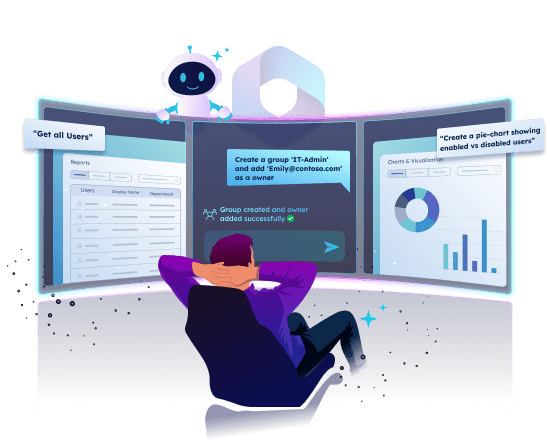
Stop struggling with cmdlets and scripts. With natural language queries, you can simply type your request in plain text, and the AdminDroid AI Assistant for M365 instantly understands and executes it.

Turn Microsoft 365 Data into Charts, Graphs, and Insights Instantly

Stop crunching numbers. Turn Microsoft 365 reports into powerful visuals in seconds.

Transform your Microsoft 365 data into insightful interactive charts, graphs, and custom tables automatically. Just ask and watch your M365 data come alive in real time. Query and generate multiple charts and customize them to highlight exactly what matters most to you.

Perform Microsoft 365 Management Actions Effortlessly

Say it. See it done. AdminDroid AI Assistant manages Microsoft 365 your way.

Type your request in plain English and instantly add users, assign licenses, update groups, and perform everyday admin tasks. No cmdlets to memorize, no switching portals, just quick results.

Secure Your Sensitive Data from AI Access

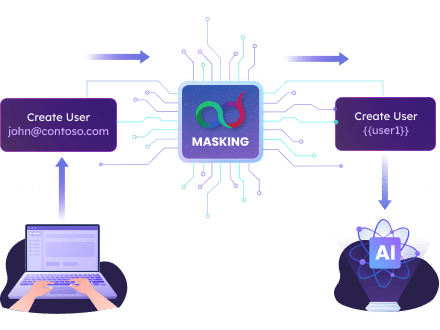
AdminDroid AI Assistant hides sensitive information from AI by masking real data with secure placeholders. This ensures that no private or confidential information ever leaves your environment.

Keep Sensitive Data Safe Automatically

Automatically hides personally identifiable information (PII) such as emails, UPNs, phone numbers, and credit card details from AI by default, ensuring your original data always stays protected.

Protect Any Data You Choose

Want to mask something else? Simply wrap it in double quotes and AdminDroid AI Assistant will automatically protect it too, keeping even non-standard data secure.

Secure Your Sensitive Data from AI Access
Masking
Input
How AI see
Automatic masking
Get user john@contoso.com details 
Get user {user1} details
Advanced masking
Create security group “Development”
Create security group {group1}
Unmasked
Create security group Development

Getting the Best Results

Always mention the object type (such as user, group, or team) in your query so the tool knows exactly what you are referring to. Here are a few things you can try right away:

  • Modify Job Title of user alex@contoso.com to Job Title “Developer”.
  • Get details of the group “Team AI”.

Frequently Asked Questions

1. How can I verify that masking is working?

The tool shows a preview of how your input is transformed, helping you verify that sensitive data is properly protected.

2. Will masking affect how my requests or data are processed?

No, masking only replaces or hides sensitive values to protect your privacy. The system still understands your request and processes it correctly, while keeping your private data hidden from external services.

3. I’ve enabled masking, but I forgot to use double quotes around my email address or phone number. Will it still be masked?

Yes. Common sensitive data types like UPNs, emails, phone numbers, and URLs are masked automatically, even without double quotes. Quotes are only needed for custom or uncommon data that you want to protect.

4. Is masking applied to all queries by default?

No. Masking is automatically applied only for standard PII like emails, phone numbers, URLs, or UPNs. For custom or uncommon data, you need to enclose it in double quotes to ensure it is masked.

5. How can I mask custom or non-standard PII data?

To mask custom sensitive data, enclose it in double quotes. This ensures that any information not automatically detected, such as internal IDs, project codes, or object names, is protected.

6. Can I choose to turn masking on or off?

Yes, you have full control over masking sensitive data. Simply toggle to activate or deactivate masking. It is ON by default.

7. Can I combine automatic and custom masking in the same query?

Yes. Automatic masking will handle standard PII, while you can also apply custom masking for other sensitive data in the same input by enclosing it in double quotes.

8. Why is masking important?

  • Protects your personal information from AI exposure.
  • Helps you comply with privacy regulations and best practices.
  • Prevents your data from being used for AI training or analysis without your permission.

Pick the AI That Works Best for You

Flexibility is built-in. Choose from five leading AI models: Claude, Groq, Gemini, ChatGPT, and Cohere. You’re never locked into a single provider, and you can switch anytime. This ensures reliability, redundancy, and the freedom to select the model that best fits your needs.

Pick the AI That Works Best for You

Keep Data Secure Every Step of the Way

Every time you sign in, your identity is protected with Microsoft’s own secure login system. That means safer access for you and stronger protection for your data.

Multi-tenant Management Made Simple

Manage all your Microsoft 365 tenants effortlessly from one console. Switch between tenants, view reports, and perform admin actions without signing out. Enjoy unified visibility and seamless control across every tenant—no more juggling logins or tabs.

Grant Permissions Only When You Truly Need To

The smart permission system of AdminDroid AI Assistant for M365, follows the principle of least privilege. Instead of requesting full access upfront, it only asks for permissions when needed. This dynamic consent approach keeps things transparent, secure, and compliant with Microsoft best practices.

Microsoft 365 Management Made Simple for Everyone

AdminDroid AI Assistant makes Microsoft 365 management easy for everyone. With a clean interface, natural queries, and one-click visualizations, you don’t need technical expertise to get powerful insights.

Feature
Admin Center
PowerShell
AdminDroid AI Assistant for M365
Find & Search
Manual search
Cmdlet-based queries
Natural language queries
Data Visualization
Limited tables
Scripted charts
One-click tables & charts
Reporting Capabilities
Scattered in Separate portals
Limited & Scripted reports
All reports in one place
Management Tasks
Limited admin actions
Full control via scripts
Manage everything in one console
Interactive Data Exploration
No
No
Conversational follow-ups

Ready to Transform Your Microsoft 365 Experience?

Get started in minutes and see how easy it is to manage Microsoft 365 with natural language queries. Just ask and let the AdminDroid AI Assistant for M365 do the heavy lifting. Download now and unlock a faster, smarter, and more secure way to work with your tenant.

Download